
Zoho Development Company in India: Customize, Automate, and Scale Your Business Operations
Most businesses adopt Zoho because it's affordable and feature-rich —...

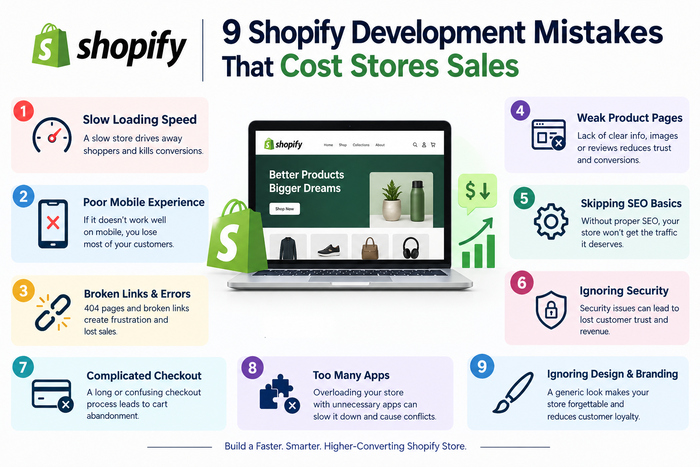
You launched your store, the design looks great, and the first few orders came in. Then traffic grows, but sales don’t. Visitors leave, carts get abandoned, and you can’t figure out why.
In many cases, the problem isn’t your product or your ads. It’s something hidden in how the store was built. Poor Shopify development quietly leaks sales every day, and most owners don’t notice until the damage is done.
This guide covers nine common mistakes, why they hurt revenue, and how to fix them. It’s useful whether you’re building a new store or working with a Shopify development company in India, the USA, or anywhere else.
1. Choosing a Theme for Looks Instead of Speed
A beautiful theme with heavy animations, large sliders, and oversized images can slow your store to a crawl. Shoppers on mobile data won’t wait. Google also measures speed through Core Web Vitals, so a slow store can hurt both sales and search visibility.
How to fix it:
A skilled developer will balance design with performance instead of treating them as opposites.
2. Installing Too Many Apps
The Shopify App Store makes it easy to add reviews, pop-ups, countdown timers, and upsell tools. But each app can add scripts that load on every page. Install ten of them and your store gets slow and cluttered.
Leftover code from deleted apps is another hidden problem. It can stay in your theme files and keep slowing things down.
How to fix it:
Good custom Shopify development often replaces three or four apps with one clean, lightweight feature.
3. Treating Mobile as an Afterthought
Most Shopify traffic comes from phones. Yet many stores are designed on a desktop screen and only “squeezed” onto mobile later. The result is tiny buttons, hard-to-read text, and menus that frustrate thumbs.
How to fix it:
Test on a real phone, not just a browser preview. It takes five minutes and often reveals problems at once.
4. Confusing Navigation and Collection Structure
If shoppers can’t find what they want in a few clicks, they leave. Stores with messy menus, vague collection names, or too many categories lose people before they even see a product.
Poor structure also hurts SEO, because search engines use your site structure to understand what you sell.
How to fix it:
5. Ignoring SEO Basics During Development
Many owners treat SEO as something to add later. By then, the store may already have duplicate pages, missing titles, and weak URLs. Fixing it afterward costs more time and money.
SEO mistakes that cost sales:
A good Shopify development company builds SEO into the store from day one, covering site structure, speed, structured data, and clean technical setup.
6. Botching a Store Migration
Moving from WooCommerce, Magento, or another platform to Shopify is a smart move for many businesses. But a rushed migration can wipe out years of search rankings.
The most common error is forgetting 301 redirects. If old product URLs don’t point to the new ones, customers hit error pages and Google loses the ranking history you built.
How to fix it:
Never migrate without a tested plan and a backup.
7. Adding Friction to the Checkout
Checkout is where sales are won or lost. Forcing account creation, adding surprise shipping costs, or hiding payment options pushes customers to abandon their carts.
Custom code makes it worse when it’s added carelessly. Shopify has been moving toward more structured ways to customize checkout, so hacks that bypass the system can break during platform updates. Always check Shopify’s current developer documentation before changing checkout behavior.
How to fix it:
8. Skipping Proper Tracking and Analytics
You can’t fix what you can’t see. Many stores launch without correct tracking, so owners don’t know where visitors drop off, which ads work, or which products convert.
How to fix it:
Accurate data turns guesswork into decisions, and it often shows a simple fix that lifts conversions.
9. Hiring on Price Alone and Skipping Support
A very low quote can look attractive. But cheap work often means junior developers, no testing, copied code, and no help after launch. You may then spend more fixing problems than you saved.
Stores also need ongoing care: theme updates, app conflicts, security checks, and performance tuning.
Questions to ask before you hire:
Reliable teams such as Beta Soft Technology build and support stores with clear scope, testing, and handover, so you aren’t left alone after go-live.
Quick Checklist Before You Launch
If you can say yes to all eight, you’ve avoided most of the costly mistakes. If not, a Shopify development audit from a trusted partner like Beta Soft Technology can help you find and fix gaps before they cost more sales.
Frequently Asked Questions (FAQs)
1. How much does Shopify development cost?
Costs vary with the type of project. A simple store using a ready-made theme costs far less than a custom build with integrations. Hourly rates in India are generally lower than in the USA or UK, so always compare detailed quotes rather than a single price.
2. Why is my Shopify store getting traffic but no sales?
Common causes include slow loading, poor mobile design, a confusing checkout, weak product pages, or missing trust signals like reviews. Analytics data can show where visitors drop off.
3. Do too many apps slow down a Shopify store?
Yes, they can. Many apps add scripts that load on every page. Remove apps you don’t need and check for leftover code after uninstalling.
4. Is Shopify good for SEO?
Shopify gives you a solid SEO foundation, but results depend on setup. Clean structure, good content, fast speed, and proper meta tags still matter.
5. How do I choose a Shopify development company?
Check live projects, read reviews on platforms like Clutch, ask about support and code ownership, and look for clear communication.
6. Should I use a custom theme or a ready-made theme?
Ready-made themes suit small budgets and simple stores. Custom themes are better when you need unique features, strong branding, or specific performance goals.
7. How long does Shopify development take?
A basic store may take a few weeks. A custom store with integrations or migration can take two to four months, depending on scope.
8. Is it safe to hire a Shopify developer from India?
Yes, if you choose a verified company with real work to show. Sign a clear agreement with an NDA and make sure you own your code and store access.
Final Thoughts
Most lost sales don’t come from one big failure. They come from small, fixable problems: a slow page, a clumsy menu, a missing redirect, or an extra checkout step. Review your store against these nine mistakes, fix the easiest ones first, and measure the difference. Small improvements add up quickly.
Most businesses adopt Zoho because it's affordable and feature-rich —...

Every year, hundreds of businesses in Delhi search for a...

In today’s competitive digital landscape, businesses need web applications that...
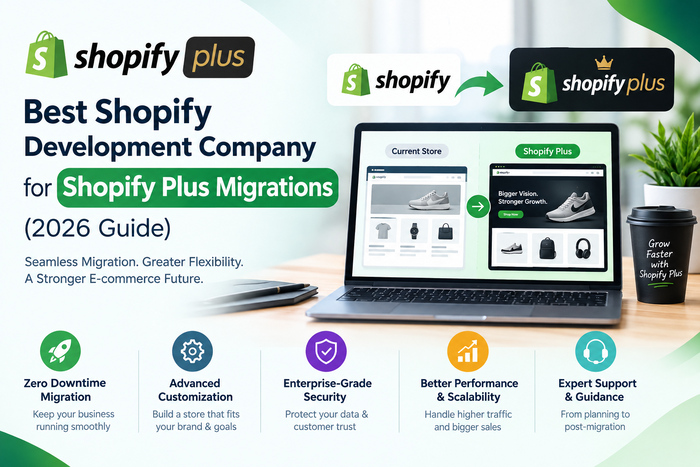
Migrating to Shopify Plus isn't the same as launching a...

You have a product, a brand name and a budget....
You launched your store, the design looks great, and the...
You launched your store, the design looks great, and the...

Customers need to be guaranteed thorough scrutiny of their situation...

As long as you are a consumer, company, contractor, insurance...

Get in touch with DRT Lawyer Delhi to seek legal...